
Choosing the Right Documentation Automation Tools for Your Team
A complete guide to choosing the right documentation automation tools for your team.
Choosing the Right Documentation Automation Tools for Your Team
So, what exactly are documentation automation tools? Think of them as AI-powered assistants that read through your customer support conversations—like solved tickets—to figure out what’s missing from your help center. They then automatically suggest or even draft new articles to fill those gaps.
This shifts your entire support and content operation from a reactive, fire-fighting mode to one of proactive, strategic content creation.
Why Automated Documentation Is a Game Changer

If you're at a scaling company, you know the pain: a knowledge base that's always slightly out of date and a never-ending flood of repetitive support tickets. The old way of fixing this—having someone manually sift through tickets to spot recurring issues—is painfully slow, wildly inefficient, and almost guaranteed to miss the more subtle trends.
This is where automation completely changes the game for your support function.
Shifting From Reactive to Proactive Support
Instead of waiting for frustrated customers to point out the holes in your documentation, these tools get ahead of the problem. They proactively scan your solved support tickets, using AI to spot common questions and undocumented problems. This means the system can tell you exactly what content is missing or needs a refresh. It is the same AI-for-documentation approach that powers a modern automated service desk.
It’s a data-driven approach that ensures your team is always working on the most critical updates, not just guessing. This is part of a much bigger move toward smarter business processes. In fact, the market for Intelligent Document Automation (IDA) software is expected to hit $14.66 billion by 2025, as more businesses look for AI-powered ways to work smarter. Explore more insights on the IDA market growth to see where the industry is headed.
Augmenting Human Expertise, Not Replacing It
There's a common fear that tools like these are meant to replace technical writers. The reality is the complete opposite. They act as a powerful sidekick, taking on the grunt work of discovery so your content experts can do what they do best: craft clear, accurate, and genuinely helpful documentation.
By automating the discovery of knowledge gaps, teams can save dozens of hours each month. This allows skilled writers to apply their expertise to refining complex topics and ensuring brand voice consistency rather than hunting for problems.
The benefits are straightforward and tie directly to your bottom line:
- Boosted Ticket Deflection: When your knowledge base is actually accurate and complete, customers can find their own answers. This means fewer tickets hit your support queue in the first place.
- Increased Customer Satisfaction: People love fast, easy self-service. Empowering them with great resources leads to happier, more loyal customers.
- Improved Team Efficiency: Your agents and writers get to spend less time on repetitive questions and more time on the strategic work that really matters.
How to Evaluate Documentation Automation Tools

Choosing the right documentation automation tool isn't about chasing flashy features. It's about finding a solution that actually works for your team and delivers real results. A solid evaluation framework helps you pick a tool that slides right into your workflow and adds immediate value.
Let's be clear: not all platforms are created equal. You need a way to cut through the noise.
This framework is built on seven critical pillars. Think of them as a checklist. Each one represents a core capability that separates a basic gadget from a genuine operational asset. By measuring every tool against these criteria, you can confidently find the one that fits your team’s real-world needs.
1. Integration and Workflow Efficiency
The first test is simple: how well does it play with your existing setup? A tool that demands a complicated installation or constant babysitting just creates more work. You want seamless, one-click integrations, especially with your help desk, like Zendesk. The goal is to improve your current process, not force you into a clunky, disconnected system.
A good tool needs to manage the entire content lifecycle, from the initial idea all the way to publication. This end-to-end workflow is what saves you time.
Ask yourself how the platform handles these key steps:
- Content Suggestion: Does it proactively spot knowledge gaps from actual support tickets?
- Draft Generation: Can it create a solid first draft for a writer to polish?
- Review and Approval: Is there a simple, built-in process for your experts to sign off on content?
- One-Click Publishing: Can you push approved articles live without ever leaving the platform?
The most powerful documentation automation tools don't just find problems—they guide the solution from discovery to publication. This complete workflow saves hours of manual coordination and ensures nothing falls through the cracks.
2. Content Accuracy and Editorial Control
Automation brings speed, but human expertise brings quality. The best systems run on a human-in-the-loop model. The AI does the heavy lifting—analyzing data and creating drafts—but your team always has the final say. This editorial control is non-negotiable if you want to maintain your brand’s voice and technical accuracy.
Behind the scenes, AI-powered accuracy is what makes it all work. The tool should be smart enough to create relevant, context-aware content, not just bland summaries. This ticket-driven approach means you’re solving real customer problems, which is the fastest way to improve your self-service success.
3. Security and Demonstrable ROI
Last but not least, any tool that touches customer data must have enterprise-grade security. Period. Make sure the platform uses secure APIs, encrypts data, and complies with standards like GDPR. Your customer data is your responsibility, and your tools have to protect it.
Ultimately, the real measure of success is a clear return on investment. A top-tier tool should directly contribute to ticket deflection by making your knowledge base smarter and more effective. Ask potential vendors how their platform tracks this metric. It’s the clearest indicator of the tool’s financial and operational impact on your support team.
A Practical Comparison of Documentation Automation Tools
The world of documentation automation isn't one-size-fits-all. You’ve got a wide range of tools out there, each built for very different jobs and teams. To pick the right one, you need to look past the marketing buzz and understand the core philosophy driving each category.
Let's break the market down into three main groups. This will help you see which approach actually solves your team's biggest problems, whether that's drowning in support tickets or just needing a better way to create and manage content.
Integrated Knowledge Assistants
Think of these tools as specialists. They’re built to live right inside your help desk, like Zendesk, and their whole purpose is to analyze your customer conversations to make your knowledge base smarter. They’re fantastic at spotting recurring problems in your solved tickets and suggesting new articles or updates to fix them.
- Best for: Customer support teams, knowledge managers, and anyone in CX using a platform like Zendesk. If you need a direct, data-driven way to cut down on ticket volume, this is for you.
- Example Tool: AutoKnowledgeBase for Zendesk is a perfect example. It’s a one-click integration that focuses entirely on turning solved tickets into useful documentation, giving you a full workflow from suggestion to publishing. If you are on Zendesk, see how a dedicated assistant compares to Zendesk's built-in option in our AutoKnowledgeBase vs Zendesk Knowledge Copilot breakdown.
- Key Strength: It's all about context. Because these tools operate inside your support environment, they deliver highly relevant, actionable ideas that solve real customer issues. Your documentation efforts are always aimed at what actually matters.
General-Purpose AI Writers
This group includes the big, flexible AI content tools that can write almost anything—blog posts, marketing emails, you name it. They can definitely write technical documentation, but they weren't specifically designed to plug into your help desk and solve support problems.
- Best for: Marketing departments, dedicated technical writing teams, or any group that needs a versatile AI assistant for a bunch of different writing projects.
- Example Tool: A well-known player here is Jasper. It can generate impressive text on pretty much any topic, but you have to feed it the right prompts and ideas to create support articles.
- Limitation: While they're incredibly powerful, these writers lack the proactive analysis you get from an integrated assistant. They won't sift through your support tickets to find knowledge gaps for you; you have to bring the ideas to them. That means it’s easy to miss the real root cause of customer friction.
Standalone Documentation Platforms
These are the all-in-one platforms for creating, managing, and hosting entire knowledge bases or documentation portals from the ground up. Many are now adding AI features to help with writing, but their core strength is providing a powerful and organized home for your content.
- Best for: Companies building complex product documentation from scratch or those who need a robust, central hub to manage massive libraries of technical content.
- Example Tool: Document360 is a leading standalone solution. It gives you a structured environment with serious features like version control, team collaboration, and deep analytics on how your content is performing.
- Consideration: These platforms give you incredible control, but they often come with more setup and ongoing management. They’re great at solving the "where and how do we publish?" problem, but they don't automatically solve the "what should we write about?" problem based on what your customers are actually asking.
This distinction is more important than ever. The global document automation software market is expected to jump from USD 10.44 billion in 2026 to a staggering USD 37.24 billion by 2035. This isn't just about basic AI; it's about AI that truly understands context. The winning formula is a hybrid "human-in-the-loop" system that combines AI's speed with crucial expert oversight—a model that smart CX leaders are already embracing. You can dive deeper into these market trends in document automation.
The best choice isn't about which tool is "better" in a vacuum, but which one solves your most pressing problem. If your primary pain point is a high volume of repetitive support tickets, an integrated assistant that analyzes that data is the most direct solution.
At the end of the day, your decision comes down to your workflow. An integrated tool automates the discovery process for a support team. A general AI writer speeds up content creation for any team. And a standalone platform gives you a powerful home for all your finished documentation.
Here's a quick breakdown of how these categories stack up against the key criteria we discussed.
Feature Matrix of Documentation Automation Tool Categories
This table offers a clear comparison of how the different tool categories perform based on the essential evaluation criteria for modern support teams.
| Evaluation Criteria | Integrated Assistants (e.g., AutoKnowledgeBase) | General-Purpose AI Writers | Standalone Documentation Platforms | | :--- | :--- | :--- | :--- | | Integration | Excellent: Deep, one-click integration with specific help desks like Zendesk. | Poor: No native help desk integration; requires manual copy-pasting. | Good: Offers APIs and integrations, but setup is more involved. | | Ticket-Driven Automation | Excellent: Core feature. Automatically analyzes tickets to find knowledge gaps. | None: Lacks any direct connection to support data. | Limited: Some may offer analytics, but not proactive ticket analysis. | | Editorial Control | Excellent: AI generates drafts, but humans have 100% final approval and editing power. | Good: Full control over prompts and outputs, but requires more manual direction. | Excellent: Built-in version control and robust editorial workflows. | | Workflow Efficiency | High: Automates the most time-consuming step—identifying what to write about. | Medium: Speeds up writing, but the initial research and ideation are still manual. | Medium: Streamlines publishing and management, but not content discovery. | | Accuracy & Relevance | High: Content is based directly on real customer issues and resolutions. | Variable: Accuracy depends entirely on the quality of the user's prompts. | Variable: Depends on the quality of the content created by the human team. | | Security | High: Operates within the secure ecosystem of the connected help desk. | Variable: Depends on the provider's data policies; data is sent to a third party. | High: Typically offers robust, enterprise-grade security features. | | Return on Investment (ROI) | High & Direct: Directly reduces ticket volume and frees up agent time. | Indirect: Improves content creation speed, but the impact on support metrics is harder to measure. | Long-term: ROI is tied to improved content management and user self-service over time. |
As you can see, the "best" tool really depends on the problem you're trying to solve. For a support team aiming to reduce ticket volume with minimal effort, an integrated assistant is a clear winner. For a marketing team needing a flexible writing tool, a general-purpose AI writer makes more sense.
Real-World Scenarios and Success Stories
It's one thing to talk about documentation automation in theory, but seeing these tools in the wild is where their value really clicks. Different teams have their own unique problems, and the right tool can turn a constant operational headache into a major win.
Let's walk through a few common situations where these platforms make a real difference, helping teams improve efficiency and make customers happier.
The Agile SaaS Startup
Imagine a fast-growing SaaS company struggling to keep its Zendesk help center up to date. Product updates are rolling out so fast that the documentation can't keep up, leading to a flood of repetitive support tickets. Agents are losing hours every week answering the same basic questions over and over.
This is the perfect spot for an integrated knowledge assistant like AutoKnowledgeBase. It plugs right into their existing Zendesk workflow, automatically scanning solved tickets to spot the most common questions tied to new releases. From there, it generates draft articles that the knowledge manager can quickly review, polish, and publish.
- The Outcome: Within two months, they saw a 30% drop in repeat tickets. More importantly, they gave their support team back an estimated 10 hours per week that was previously spent on manual documentation.
The Enterprise Support Team
Now think bigger. A large enterprise with a complicated product suite has a different beast to tame: keeping a massive, multi-author knowledge base consistent and accurate. With hundreds of articles and dozens of people contributing, it was a constant battle to maintain a single source of truth. The result? Conflicting advice and confused, frustrated customers.
This team found its solution in a standalone documentation platform built with robust version control and workflow automation. It created a centralized hub where every article had a clear owner, a complete revision history, and a mandatory multi-step approval process. This structure put an end to rogue edits and ensured every piece of content met their high quality standards.
The key for large teams isn't just creating content, but governing it. Automation that enforces editorial standards and workflows is essential for maintaining trust and accuracy at scale.
This flowchart can help you visualize which path makes the most sense for you, whether your goal is to analyze support tickets or maximize creative control.
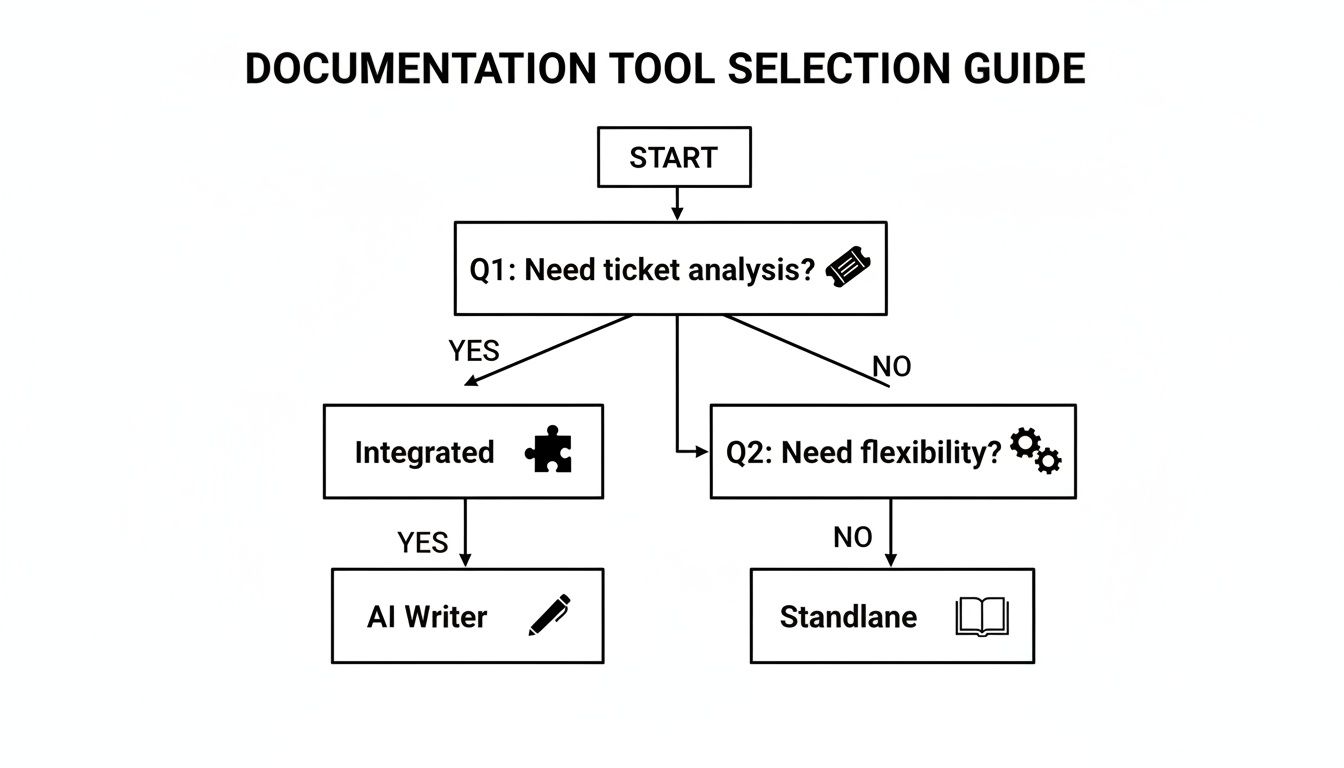
As you can see, if your primary goal is cutting down ticket volume by truly understanding what customers are asking, an integrated tool is your most direct route.
The Technical Writing Team
Finally, consider a dedicated technical writing team that wanted to get ahead of problems instead of just reacting to them. They weren't just plugging simple information gaps; their goal was to build comprehensive guides that anticipated what users would need next. The big question was where to focus their expert time for the biggest impact.
They brought in a general-purpose AI writer to speed up the foundational work. The AI could generate initial drafts on complex subjects, handling the heavy lifting of research and basic writing. This freed up the writers to do what they do best: add expert insights, craft detailed examples, and create high-quality visuals.
It's a smart move, and the market agrees. The workflow automation market is projected to hit USD 40.77 billion by 2031, which shows just how much businesses value these kinds of efficiency gains. You can learn more about these workflow automation market trends and how they're changing modern operations.
Putting Your Automated Documentation Strategy into Action
Rolling out a new tool is never just about the tech. It’s about the people and the process. For any documentation automation tool to actually make a difference, you need a solid plan. A clear roadmap is what separates a tool that gathers digital dust from one that becomes an indispensable part of your team's daily life.
A great rollout isn't a one-and-done event. It's a thoughtful process that starts with getting your team genuinely excited, moves into a painless setup, defines new workflows, and ends with you being able to prove it was all worth it.
Getting Your Team On Board
Before you click "install," your first job is to get your team on your side. Your support agents and technical writers have to see this new platform as a helper, not a replacement. The key is to frame it as a way to kill off the grunt work—like manually digging for knowledge gaps—so they can focus on work that really matters.
Show them what’s in it for them, specifically:
- For Agents: Faster, better answers mean they can resolve tickets in a flash and keep customers happy. No more frantic searching while a customer waits.
- For Writers: The guesswork is gone. They’ll get a data-backed list of what content is needed most, freeing them up to write the deep, expert-level articles they actually enjoy.
The quickest way to get buy-in? Draw a straight line from the tool's features to your team's biggest headaches. Automation should be a painkiller, not another problem to solve.
Nailing the Setup and Workflow
Once everyone's excited, the technical part needs to be dead simple. Modern tools, especially those built to work with platforms like Zendesk, should be a one-click install. A clunky, complicated setup process is a huge red flag and will kill all that good momentum you just built.
With the tool installed, the next step is crucial: setting up a rock-solid review and approval workflow. This is non-negotiable for keeping your content quality high. Your process has to be crystal clear on who gets pinged when a new article is suggested, who does the first draft review, and who has the final say before anything goes live. This human-in-the-loop system is the secret sauce—it lets AI speed up content creation without sacrificing your brand voice or technical accuracy.
Measuring What Matters and Proving ROI
Finally, you have to prove it's working. A successful implementation is one you can back up with hard numbers. The whole point of documentation automation is to boost customer self-service and take some of the pressure off your support team.
Start tracking these key metrics from day one:
- Ticket Deflection Rate: What percentage of customers found an answer in your knowledge base instead of opening a ticket? This is your golden metric.
- Time to Resolution: How much faster are agents closing tickets now that they have better internal docs at their fingertips?
- Content Creation Velocity: How many new, relevant articles are you publishing each week or month?
Watching these numbers improve over time gives you a clear picture of your return on investment and makes it a no-brainer to keep investing in your new documentation strategy.
Frequently Asked Questions
When you're looking at documentation automation, a few key questions always come up. It's natural to wonder about cost, security, and how a new tool will actually fit in with your team. Let's tackle those common concerns head-on.
We'll get straight to the point and give you the clear answers you need to feel confident moving forward.
Will Documentation Automation Tools Replace My Technical Writers?
Not a chance. In fact, it's the opposite. These tools are designed to be a powerful assistant for your writing team, not a replacement.
Think about it: they handle the grunt work. They sift through mountains of support tickets to spot knowledge gaps and find recurring problems—the tedious tasks that eat up your writers' valuable time. This frees your experts to focus on what they do best: crafting exceptional, in-depth articles, refining complex topics, and making sure every piece of content hits your quality standards. The best systems always include a human in the loop, so your team gets the final say before anything goes live.
How Secure Is My Customer and Ticket Data?
This is non-negotiable, and any tool worth its salt puts security first. The leading solutions are built with enterprise-grade security from the ground up, using standard protocols to keep your information locked down.
When you're evaluating a platform, be sure to ask about their security practices. You'll want to confirm a few key things:
- Data Encryption: Is data encrypted both in transit (moving between systems) and at rest (stored on servers)?
- Secure APIs: Does the tool use official, secure APIs to connect with platforms like Zendesk?
- Compliance: Does it adhere to major data privacy regulations like GDPR?
These measures ensure your sensitive ticket data is handled with the highest level of care. The system should only access the bare minimum information it needs to do its job.
A tool's value is instantly negated if it creates a security risk. Prioritize platforms that are built on a foundation of trust and can demonstrate a clear commitment to protecting your company's and your customers' data.
How Quickly Can We See a Return on Investment?
You'll likely see the ROI from documentation automation tools much faster than you'd expect, often within the first couple of months. The first win is immediate: your team stops wasting time manually digging through tickets to find problems. That's a direct operational cost saving right there.
As the AI-driven suggestions help you build out a more comprehensive and accurate knowledge base, you'll start seeing an impact on your core support metrics. The big goals here are ticket deflection (a big drop in incoming tickets) and faster resolution times for your agents, who now have the answers they need at their fingertips. Many of the best tools offer a free trial, so you can see these benefits for yourself before you commit.
What if Our Knowledge Base Is Currently a Mess?
That's actually the perfect starting point. Instead of kicking off a massive, resource-draining manual audit, an automation tool helps you clean up your knowledge base systematically over time. It's a targeted, data-driven approach.
The system will start by analyzing your newly solved tickets. From there, it will suggest updates to your most problematic existing articles or create new drafts to address the most common undocumented issues. This means you’re fixing the biggest gaps first, giving you the most significant impact on your ticket volume with the least amount of upfront work.
Ready to stop chasing down knowledge gaps and start proactively improving your help center? AutoKnowledgeBase integrates seamlessly with Zendesk to turn your solved tickets into a powerful engine for documentation improvement.
Start your free trial today — or see plans and pricing — and see the results for yourself.
Related articles
A Guide to AI for Documentation Automate Your Help Center
A complete guide to using AI for documentation to automate your help center and transform your support workflow.
GuideA Guide to the Automated Service Desk for Zendesk
A complete guide to the automated service desk for Zendesk.
ComparisonAutoKnowledgeBase vs Zendesk Knowledge Copilot: An Honest Comparison for Support Teams
An honest comparison of the two tools that turn solved Zendesk tickets into knowledge base articles, and how to tell which one your team actually needs.