
A Guide to the Automated Service Desk for Zendesk
A complete guide to the automated service desk for Zendesk.
A Guide to the Automated Service Desk for Zendesk
So, what exactly is an automated service desk?
Think of it less like a traditional help desk and more like a brilliant, tireless digital teammate. It’s a support system that uses smart technology to handle common issues, route requests, and manage tasks automatically, often without any human touch needed. It finds answers in a flash, gets smarter with every interaction, and gives users the power to help themselves—freeing up your team to tackle the really tough problems.
From Reactive Support to a Proactive Ecosystem
A traditional service desk can feel a lot like an old-school telephone switchboard. An agent has to manually plug in every single call, connecting it to the right person. It's slow, mistakes happen, and as the calls (or tickets) pile up, a major bottleneck forms.
An automated service desk rips out that old switchboard and replaces it with an intelligent, proactive system.
Instead of just logging and assigning tickets one by one, this modern approach automates the entire lifecycle of a support request. It's built to anticipate what customers need, serve up instant solutions, and only loop in a human agent when it’s absolutely necessary. This isn't just about moving faster; it's about building a smarter, more resilient support foundation for your entire business.
The Core Philosophy of Automation
The goal here is simple: let technology handle the repetitive, low-impact tasks so your human experts can focus on high-value, complex challenges.
That means setting up automations for things like:
- Password Resets: Granting access instantly without an agent needing to lift a finger.
- Information Requests: Pointing users directly to the right knowledge base article.
- Ticket Triage: Automatically sorting, prioritizing, and assigning tickets to the right team based on keywords, user history, or the request type.
This shift from manual to automated is why the market is exploding. The global helpdesk automation market is expected to jump from USD 8.23 billion in 2025 to a massive USD 40.76 billion by 2031. Businesses are scrambling to manage huge support volumes and cut costs without sacrificing the 24/7 service customers now expect. You can get more details from this helpdesk automation industry research.
It’s More Than Just a Chatbot
It's easy to hear "automation" and just think of a simple chatbot. But a true automated service desk goes much, much deeper. While chatbots are part of the toolkit, a fully realized system weaves multiple technologies together for a completely seamless experience.
An automated service desk acts as an intelligent layer over your entire support operation. It connects your knowledge base, ticketing system, and user portals to create a self-sufficient system that deflects tickets and resolves issues before they ever reach an agent.
This integrated approach means automation doesn't just answer questions—it actively solves problems and strengthens your support infrastructure over time. By learning from every interaction, it refines its own responses, helps keep documentation up-to-date, and gets smarter every day. It creates a powerful cycle of continuous improvement that benefits everyone.
To really understand the jump we're talking about, it helps to see the two models side-by-side. The difference isn't just incremental; it's a fundamental change in how support operates.
Traditional Service Desk vs. Automated Service Desk
| Feature | Traditional Service Desk | Automated Service Desk | | :--- | :--- | :--- | | Primary Function | Manual ticket logging and agent-based resolution. | Automated ticket deflection and intelligent routing. | | Response Time | Dependent on agent availability; often hours or days. | Instant for common issues; seconds or minutes. | | Availability | Typically limited to business hours. | 24/7/365, always on. | | Agent Focus | Repetitive, high-volume, low-impact tasks. | Complex, high-value, strategic problem-solving. | | User Experience | Reactive; users wait in a queue for help. | Proactive; users get instant answers via self-service. | | Scalability | Difficult and expensive; requires hiring more agents. | Highly scalable; handles increased volume with ease. | | Cost Model | High operational costs tied to headcount. | Lower operational costs; high ROI through efficiency. | | System Intelligence | Static; relies entirely on human knowledge. | Dynamic; learns and improves with every interaction. |
This table shows a clear evolution: from a system that simply manages problems to one that actively prevents them. It’s a move from being a cost center to becoming a strategic asset that drives customer satisfaction and business efficiency.
The Core Components of Service Desk Automation
So, what’s actually inside an automated service desk? It’s not just one piece of software; it’s a set of interconnected parts working together. Think of it like a high-performance engine. Each component has a specific job, and when they all fire in sync, you get incredible efficiency and power.
A modern automated service desk really stands on four pillars. Each one takes a chunk of the manual grunt work out of your support process and replaces it with swift, intelligent action. Let's pull back the curtain and see how each one works.
AI-Driven Knowledge Management
At the very heart of any top-tier automated service desk is its brain: AI-driven knowledge management. This is way more than a simple library of articles you manually update every six months. It's a living, breathing system that actively learns from every single ticket your team resolves.
Imagine your knowledge base getting smarter on its own. When an agent solves a tricky ticket in a platform like Zendesk, an AI tool like AutoKnowledgeBase can analyze that solution. It spots patterns, sees where your current documentation has gaps, and automatically drafts a new article or suggests an update to an existing one. This means your help center never goes stale. For a deeper look at how this works, see our guide on using AI for documentation.
The real magic is this continuous learning loop. It turns your solved tickets from a simple archive into fuel for future self-service. Your knowledge base doesn't just grow—it gets smarter and more effective with every interaction.
This is the foundation for real ticket deflection. By keeping your content fresh and accurate, you give users the power to find their own answers, which is a massive win for your support team’s workload.
Intelligent Ticket Routing
Next up is intelligent ticket routing. This component acts like an expert traffic controller for your support queue, making sure every new ticket lands with the right person or team instantly. It completely gets rid of the manual triage process, which is often a huge bottleneck.
Forget having a manager read and assign every single ticket. Automation handles it. The system scans a ticket’s content, keywords, who sent it, and even their past support history to make a split-second decision on where it needs to go.
This all works based on simple rules you set up:
- Keyword Analysis: A ticket with "billing issue" or "invoice question" gets routed straight to the finance team. No pit stops.
- User Segmentation: A message from a VIP customer? It’s automatically escalated and flagged as high-priority.
- Product-Specific Rules: A bug report mentioning your mobile app is sent directly to the mobile dev support queue.
This simple change means faster replies, period. Tickets don't sit around waiting for someone to assign them. The right expert sees it immediately, which is a huge step toward nailing that first-contact resolution.
Automated Workflows
Then you have automated workflows, the tireless workhorses of the system. These are pre-built recipes that handle repetitive, multi-step jobs without anyone needing to lift a finger. This is how you rescue your agents from the soul-crushing tasks they hate.
Just think about the most predictable, common requests your team deals with every day. Those are prime targets for automation.
Example Workflow: The Password Reset
- A user fills out a "password reset" form.
- The system automatically sends a verification link to their registered email.
- Once they click it, a secure reset link is generated and sent.
- The ticket is automatically logged and closed. Done.
That whole dance happens in seconds, 24/7, and an agent never even sees the ticket. You can build similar workflows for order status updates, information requests, or new user onboarding. It’s no surprise that automating these simple tasks can cut down service desk calls by more than 40%.
Self-Service Portals
The final pillar is a strong self-service portal. This is the front door where your customers or employees interact with all the other components. It’s much more than a search bar—it’s a hub where people can find answers, log requests, and track their issues all on their own.
A truly great self-service portal is directly powered by the AI-driven knowledge management we talked about earlier. As a user starts typing their question, it proactively suggests relevant articles, guiding them to a solution before they even hit "submit." This is your first line of defense against new tickets.
When you empower people to solve their own problems, you don't just reduce ticket volume. You make them happier. They get instant answers without waiting in a queue, which gives them a feeling of control and leaves them with a much better impression of your service.
Key Benefits for Your Support Team and Business
Bringing an automated service desk into the fold isn't just a tech upgrade; it's about getting real, measurable results that make a difference across the whole company. The move from manual to automated support isn't just a small tweak—it's a strategic shift that pays off for your customers, your team, and your bottom line.
The first and biggest win you'll see is a huge drop in ticket volume. When you give users a smart self-service portal, you head off all those common, repetitive questions before they even hit an agent's inbox. This proactive move takes a massive load off your team, freeing them from the constant stress of a never-ending ticket queue.
This is where you really start to see the financial upside. Digital service desk solutions are all about cost-effectiveness and resolving issues fast—a perfect fit for Zendesk teams drowning in the same old questions. For the folks writing your help content, tools like AutoKnowledgeBase can analyze every solved ticket and suggest new articles, keeping your help center fresh and accurate. The result? Teams see 30-50% fewer tickets after making the switch. You can dig deeper into the digital service desk market trends to see the bigger picture.
Faster Resolutions and Happier Customers
When agents aren't bogged down by simple, repetitive tickets, they can give the tougher ones the focus they deserve. An automated service desk uses smart routing to get complex issues to the right expert right away. No more manual triage, which is often a major bottleneck.
This leads to a big jump in all the metrics that matter:
- First-Contact Resolution (FCR): When a ticket lands with the right specialist from the start, it's far more likely to get solved in one go.
- Average Handle Time (AHT): Agents can resolve complex problems more efficiently because they're not wasting time on password resets and "how-to" questions.
- Customer Satisfaction (CSAT): Quick, accurate answers make customers feel like their time is respected, which sends satisfaction scores soaring.
A better customer experience flows directly from a more efficient support system. When customers can find their own answers instantly or get a fast, expert response, their whole perception of your brand improves.
This boost in speed and customer happiness creates a powerful cycle. Happy customers stick around longer, and your support team can handle growth without needing to constantly hire more people, protecting your profit margins as you scale.
Elevating Your Team and Reducing Burnout
One of the most overlooked perks of an automated service desk is how it helps your human agents. Burnout is a huge problem in the support world, and it's mostly fueled by the soul-crushing monotony of answering the same simple questions day in and day out.
Automation tackles this problem directly by taking over those repetitive tasks. This fundamentally changes what it means to be a support agent.
Instead of just closing tickets, your agents become genuine problem-solvers. Their work shifts from low-impact queries to high-value challenges that require real expertise and critical thinking. This doesn't just make their job more interesting; it builds their skills, turning your support team into a powerhouse of product knowledge and customer advocacy. It reframes automation as a tool that lifts your team up, not one that replaces them.
How AutoKnowledgeBase Supercharges Your Zendesk Instance
It’s one thing to talk about the theory of an automated service desk, but it’s another to see it actually change your daily grind. This is where we connect the dots, moving from abstract ideas to a real solution that plugs right into your Zendesk instance.
Let’s be honest: the biggest headache in knowledge management isn’t creating content. It’s keeping that content alive, accurate, and genuinely helpful over time.
This is the exact problem AutoKnowledgeBase was built to solve. Think of it as a smart AI layer for your Zendesk setup, designed specifically to fight the endless battle against stale documentation. It turns your knowledge base from a dusty library into a living, breathing ecosystem that gets smarter with every single customer interaction.
This screenshot shows the clean, intuitive interface where your knowledge managers can review and approve AI-generated article suggestions.
The platform gives you clear, actionable insights pulled directly from solved tickets, making the whole process of updating your help center fast and completely data-driven.
Turning Solved Tickets into Smart Content
At its core, what AutoKnowledgeBase does is beautifully simple. It constantly analyzes your stream of solved Zendesk tickets in real-time. Picture an intelligent assistant reading every agent-customer conversation, hunting for patterns, repeat problems, and knowledge gaps your current help center is missing.
When it spots a new issue that keeps popping up, or finds a better fix for an old problem, it doesn't just send you a notification. It automatically drafts a new article or suggests a specific update to an existing one. This is the engine that drives a truly automated service desk—it uses your team's hard work to build the resources that will lighten their load tomorrow.
This is what makes the system proactive. Instead of waiting for a manager to sift through ticket trends at the end of the month, the system flags opportunities for improvement the moment they surface.
Seamless Integration with Full Control
Jumping into advanced automation can feel like a huge project, but the integration here is designed to be completely frictionless. AutoKnowledgeBase connects to your Zendesk account with a single click and starts delivering value in minutes, not months. Our getting started guide walks through the whole connection step by step. There's no complex setup or long implementation required.
Once it's connected, the analysis begins right away, but you are always in the driver's seat. This is a crucial point for any knowledge manager who obsesses over quality and brand voice.
AutoKnowledgeBase works on a "review and approve" model. The AI makes suggestions, but a human gives the final OK. This gives your team complete editorial control to tweak, edit, and ensure every piece of content is perfect before it goes live.
This workflow is the perfect balance of AI speed and human oversight. You get the efficiency and insight of artificial intelligence without ever giving up the accuracy and consistency your customers rely on.
The Business Impact of an Automated Knowledge Ecosystem
By automating the most draining part of knowledge management—figuring out what to write about—AutoKnowledgeBase turns your Zendesk instance into a self-sufficient system. The positive effects are felt across your entire support operation.
- Drastically Less Manual Work: Your knowledge managers and writers can stop hunting for article ideas and start focusing on crafting truly high-quality content. This easily saves hours every single week.
- Better Self-Service Adoption: When the knowledge base is always fresh and relevant, customers are way more likely to find answers themselves. This leads to major ticket deflection.
- Faster Agent Onboarding: New agents get a rich, accurate, and up-to-date library of information to learn from, helping them get up to speed in a fraction of the time.
- Happier Customers: Customers get faster, more consistent answers, whether they find them on their own or speak to an agent who is armed with better resources.
Ultimately, this tool is the missing link connecting your support team's daily grind to your long-term knowledge strategy. It makes sure every solved ticket contributes to a smarter, more efficient automated service desk, creating a powerful cycle of continuous improvement.
Your Roadmap to Implementing Zendesk Automation
Diving into automation can feel like a huge project, but when you break it down, it's really just a series of clear, manageable steps. This roadmap is your playbook for getting started with automation in Zendesk, focusing on practical wins that deliver value right away. Think of it less like a massive overhaul and more like a phased rollout that builds momentum.
<iframe width="100%" style="aspect-ratio: 16 / 9;" src="https://www.youtube.com/embed/qtds_8C_2Ag" frameborder="0" allow="autoplay; encrypted-media" allowfullscreen></iframe>The journey starts with the most valuable asset you already have: your existing ticket data. By digging into the support requests your team handles every day, you can pinpoint the exact friction points and repetitive tasks that are screaming out for automation. This data-first approach ensures you’re putting your energy where it will make the biggest difference.
Identify High-Impact Automation Opportunities
Before you build a single workflow, you have to know what to automate. Start by analyzing your Zendesk tickets from the last 90 days. Look for recurring themes and simple questions that eat up a surprising amount of your team’s time.
Key areas to look for include:
- Common "How-To" Questions: What simple instructions are your agents typing out over and over again?
- Password Resets and Account Access: These are classic, low-value tasks just begging to be automated.
- Status Updates and Information Requests: Queries about order status or account details can almost always be handled without a human.
- Simple Triage Categories: Find tickets that always get routed to the same team or agent.
This initial analysis is your treasure map. It shows you all the low-hanging fruit—the quick wins that will free up your agents and prove the power of an automated service desk from day one.
Set Up Foundational Automation Rules
Once you've picked your targets, it's time to build out some foundational automation right inside Zendesk. Using its native triggers and automations, you can start handling basic tasks without needing any complex tools.
For example, you could create a trigger that automatically replies to tickets with "password reset" in the subject line. The trigger sends a link to your self-service reset tool and then closes the ticket. Done. Or, you could set up a rule that assigns any ticket containing the word "invoice" directly to the billing department, cutting out the manual triage step completely.
Start small and be specific. The goal isn’t to automate everything at once. It’s to build a few reliable workflows that handle high-volume, low-complexity tasks. This creates a solid foundation you can build on later.
These first few rules give your support team immediate relief, proving the concept and building confidence in your new automation strategy.
Integrate an AI Knowledge Tool
With your basic workflows humming along, it’s time to supercharge your self-service. This is where a tool like AutoKnowledgeBase comes in. While Zendesk rules are great for simple routing, an AI tool automates the most time-consuming part of knowledge management: keeping your help center articles fresh and relevant. (Not sure which tool fits? Compare your options in our guide to choosing documentation automation tools.)
The diagram below shows how AutoKnowledgeBase works. It analyzes incoming tickets, spots knowledge gaps, and suggests new or updated content to keep your help center sharp—automatically.
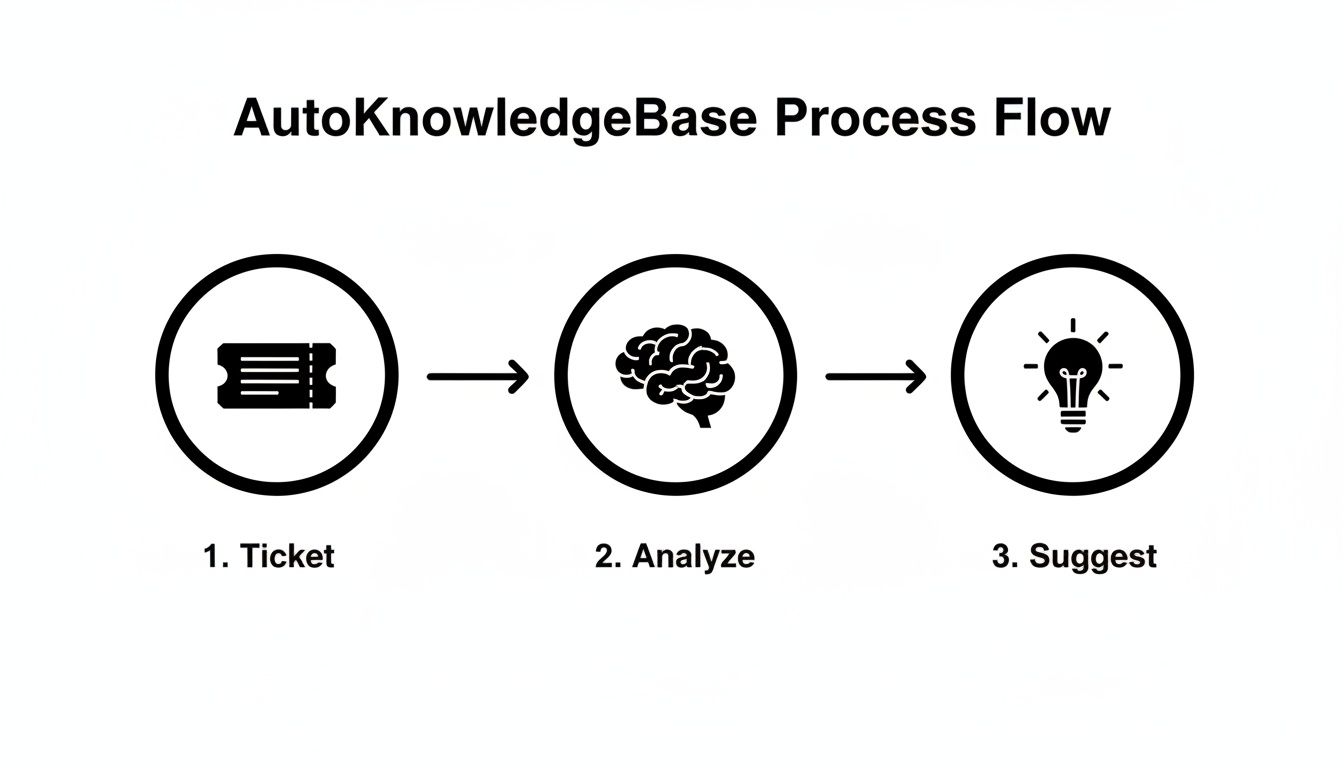
This process turns your solved tickets into a constant stream of fuel for your self-service portal, making sure it never gets stale.
Putting an AI-powered tool to work basically puts your content maintenance on autopilot, a critical step toward building a truly scalable automated service desk. This market, known as Automation as a Service (AaaS), is expected to hit USD 40.4 billion by 2031. For SaaS companies on Zendesk, this means AI can detect documentation gaps from ticket patterns, slash manual work, and drive up self-service rates. You can explore more AaaS market trends to see just how fast it's growing.
Measure Success with the Right KPIs
Finally, you need to measure the impact of all this work. Tracking the right key performance indicators (KPIs) will show you what’s working and where you can make improvements.
Focus on these essential metrics:
- Ticket Deflection Rate: What percentage of users found an answer in your help center without ever creating a ticket?
- First-Contact Resolution (FCR): A jump here shows that your intelligent routing is getting tickets to the right expert faster.
- Self-Service Adoption: Are more people using your knowledge base and self-service portal? Track the usage to find out.
By following this roadmap, you can methodically build a powerful, efficient automated service desk that scales with your business, keeps your customers happy, and frees up your support team to do their best work.
Answering Your Automation Questions
Whenever support leaders start digging into the idea of an automated service desk, the same questions tend to pop up. These aren't just about the tech; they're the real-world, "how does this actually affect my team?" concerns. Let's tackle them head-on so you can move forward with a clear picture.
Will Automation Replace My Support Agents?
This is usually the first question, and I get it. The good news? The answer is a hard no. The point of an automated service desk isn’t to replace your agents, it’s to unleash them.
Think of it this way: automation takes over the most mind-numbing, repetitive parts of the job. Password resets, "where's my order?" updates, and basic how-to questions don't need a human touch. They’re perfect for a machine.
By handing off that grunt work, your agents stop being ticket-closing machines and start being genuine problem-solvers. They can finally focus on the messy, complex issues where their expertise makes a real difference. Their jobs become more interesting, burnout drops, and your support team transforms into a powerhouse that builds real customer loyalty.
How Much Technical Skill Is Needed for Setup?
The idea of a big implementation project can be intimidating, conjuring up images of complex code and endless meetings. But modern automation tools, especially for a Zendesk team, are built to be surprisingly straightforward.
You can get a lot done right out of the box using Zendesk’s own triggers and rules—no coding needed. That handles your basic ticket routing and canned responses with just a few clicks.
When you're ready for more advanced stuff, tools like AutoKnowledgeBase are designed to plug in and go.
A core principle behind today's automation tools is the "one-click setup." Connecting an AI knowledge management tool to Zendesk can literally take minutes. The platform does all the heavy lifting behind the scenes, so your team can focus on strategy, not server configurations.
While having someone tech-savvy on your team never hurts, the barrier to entry is lower than ever. You can start small, get some quick wins, and build out more sophisticated workflows as you go.
How Do We Measure the ROI of Service Desk Automation?
Proving the value of any new tool is non-negotiable. For an automated service desk, the return on investment (ROI) is easy to see and track through a few key metrics. It’s a story told through a mix of cost savings, efficiency boosts, and a better customer experience.
To get started, zero in on these KPIs:
- Ticket Deflection Rate: This is your most direct measure of self-service success. It’s the percentage of customers who find their own answers without ever creating a ticket. A higher number here means immediate, direct cost savings.
- First-Contact Resolution (FCR): When smart routing gets tickets to the right person on the first try, FCR naturally goes up. It's proof that your system is getting smarter and more efficient.
- Agent Productivity: As automation handles the simple stuff, you should see agents handling fewer tickets overall but spending more quality time on complex ones. They're working smarter, not just faster.
- Customer Satisfaction (CSAT): At the end of the day, instant answers and faster resolutions make for happier customers. Tracking CSAT before and after you flip the switch will show you the direct impact on their experience.
By keeping an eye on these numbers, you can build a powerful business case that shows how automation doesn't just cut costs—it creates real value for the entire company.
Can We Still Control Our Knowledge Base Content?
Absolutely. The thought of an AI taking over your brand voice and help content is a non-starter for any good knowledge manager. That's why any well-designed automated system keeps a human in the driver's seat.
AI is fantastic at sniffing out knowledge gaps by analyzing solved tickets, but it should act as an assistant, not a director.
The best tools use a simple "review and approve" workflow. Here's what that looks like:
- AI Suggests: The system scans your ticket data and drafts a new article or suggests an update to an existing one.
- Human Reviews: Your knowledge manager gets the draft. They can edit it, add their expertise, and make sure it aligns perfectly with your brand voice and quality standards.
- Approve and Publish: Once it gets the green light, it's published to your help center with a click.
This approach gives you the best of both worlds: the raw analytical power and speed of AI, paired with the critical eye and nuanced expertise of your team. You automate the tedious discovery work without ever giving up control over the final product.
Ready to see how AI-powered automation can transform your Zendesk knowledge base? AutoKnowledgeBase analyzes your solved tickets to automatically suggest new articles, saving your team hours of manual work and ensuring your help center is always up to date. Start your free trial or compare plans and pricing and discover a smarter way to manage your support content.
Related articles
A Guide to AI for Documentation Automate Your Help Center
A complete guide to using AI for documentation to automate your help center and transform your support workflow.
GuideChoosing the Right Documentation Automation Tools for Your Team
A complete guide to choosing the right documentation automation tools for your team.
ComparisonAutoKnowledgeBase vs Zendesk Knowledge Copilot: An Honest Comparison for Support Teams
An honest comparison of the two tools that turn solved Zendesk tickets into knowledge base articles, and how to tell which one your team actually needs.